
March 3, 2026
How to Prepare Logo Artwork for Custom Mat Printing
Prepare logo artwork for a custom mat by choosing the right file type, simplifying details, checking contrast, and reviewing the proof carefully.
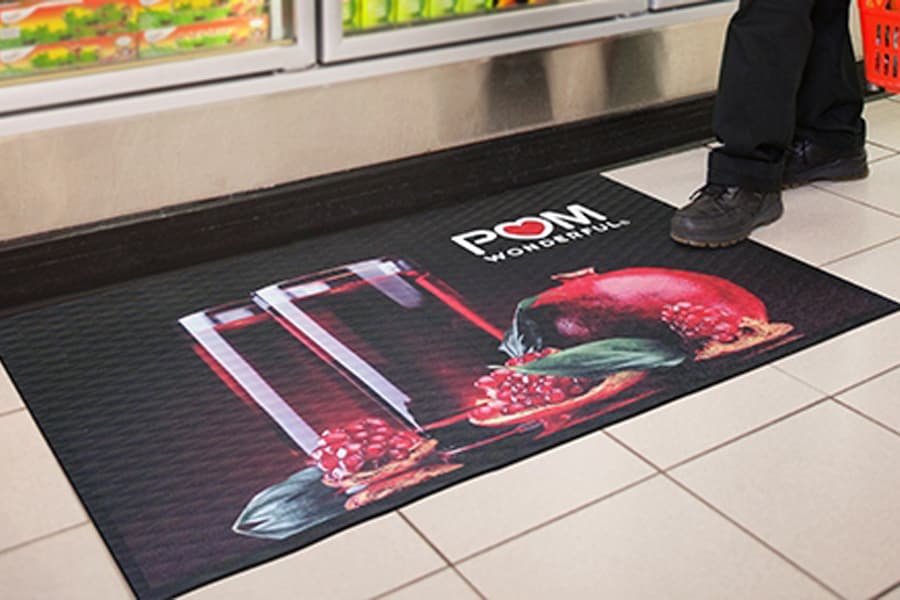
Preparing logo artwork for custom mat printing is one of the most important steps in getting a clean finished product. A logo that looks perfect on a website, business card, or sign may need adjustments before it works on a textured floor surface. The mat is larger, viewed from a different angle, walked on daily, and produced with materials that behave differently from paper or screens. Good artwork preparation helps the logo stay sharp, readable, and true to the brand.
The goal is not to make the artwork complicated. It is to make the artwork production-ready. That means using the best file type available, checking resolution, simplifying fine details, choosing practical colors, and reviewing the proof carefully before the mat is made. The earlier these details are handled, the smoother the order process becomes. A clean file can reduce back-and-forth, improve print quality, and make the finished mat look more professional.
Start With the Best File You Have
The best file for custom mat printing is usually vector artwork. Vector files are built from paths rather than pixels, which means they can scale to a large mat size without becoming blurry. Common vector formats include AI, EPS, SVG, and vector PDF. If your designer, sign company, or marketing team has a brand package, look there first. The file used for signage or print production is often much better than the logo copied from a website.
If you do not have vector artwork, provide the largest and clearest raster file available. Raster files include PNG, JPG, and TIFF. They can work when the resolution is high enough, but they are limited by the number of pixels in the file. A small logo pulled from a website header may look acceptable on screen but fall apart when enlarged for a mat. Avoid screenshots, social media profile images, email signature graphics, and compressed files whenever possible.
Understand Vector vs Raster Artwork
Vector artwork is preferred because it keeps edges clean at any size. The design team can scale the logo, adjust colors, separate elements, and check line thickness more easily. This is especially useful for custom logo mats because the finished product may be several feet wide. If the artwork includes type, shapes, mascots, badges, or icons, vector files help preserve the intended proportions and reduce quality issues.
Raster artwork is made of pixels. It can print well if the file is large enough, but it cannot be enlarged endlessly. When a low-resolution raster logo is scaled up, edges become fuzzy and small details become unclear. If raster art is your only option, send the original file rather than a copied version. A transparent PNG may be useful, but only if it is large enough. A tiny transparent PNG is still a low-resolution file.
Check Resolution Before Uploading
Resolution tells you how much detail a raster image contains. For a custom mat, the final print size is much larger than most digital uses. A logo that is 400 pixels wide may look fine on a phone but will not be enough for a large entrance mat. Higher pixel dimensions give the production team more usable information. If you are not sure, upload the best file available and let the team evaluate it, but do not assume that a file looks good simply because it opens cleanly on your computer.
Also watch for hidden quality problems. Some files have been saved repeatedly, compressed, copied from a PDF, or exported from a presentation. They may contain artifacts around edges or flattened backgrounds that make production harder. If you have multiple versions, send them all. The design team can often identify the cleanest option quickly. A file with editable paths is usually better than a prettier preview image.
Simplify Fine Details
A logo mat is a floor product, not a high-resolution brochure. Fine lines, tiny text, detailed shadows, complex gradients, and delicate outlines may not reproduce clearly on a textured surface. They can also become harder to see after normal dirt exposure. Simplifying the design often improves the finished mat. This does not mean changing the brand. It means creating a mat-ready version that keeps the most recognizable parts of the logo.
If your logo includes a tagline, ask whether the text will be readable at the intended mat size. If the tagline is important, the mat may need to be larger or the layout may need to change. If the tagline is too small, it may be better to remove it and let the main logo carry the brand. The same applies to registration marks, established dates, thin borders, and small decorative elements. Clarity is more valuable than squeezing in every detail.
Use Strong Contrast
Contrast is critical for floor-level graphics. People see the mat while walking, often from above, from an angle, or under mixed lighting. A logo with low contrast may disappear even if the colors are technically correct. Dark logo on dark background, light logo on light background, or similar mid-tone colors can all reduce readability. The proof should make it obvious where the logo begins and ends.
Brand guidelines sometimes use subtle color combinations that work well on screens but not on mats. When that happens, consider a practical adjustment. A darker background, stronger outline, simplified color set, or alternate brand-approved version can make the mat more readable. The goal is to protect brand recognition in the real environment, not to force a delicate layout onto a surface that cannot support it well.
Prepare Brand Colors Thoughtfully
If exact brand colors matter, provide the color references you have. PMS, CMYK, RGB, or HEX values can help the design team understand the intended direction. Keep in mind that mat materials, dye processes, lighting, and texture can affect how colors appear. A color on a woven or printed mat may not look identical to the same color on a glossy sign or backlit screen. Proof review is the right time to confirm whether the overall color balance feels correct.
It is also useful to think about how colors will age in the entrance. Very light backgrounds can show dirt. Very dark backgrounds can show lint, salt, or dust. Bright colors can look excellent but may need enough surrounding contrast to stay readable. If the mat will sit in a high-traffic area, practical background and border choices can help the logo look better between cleanings.
Set the Correct Orientation
Orientation is easy to overlook. A logo may need to face customers as they enter, staff as they approach a counter, or visitors moving down a corridor. Landscape layouts are common for wide entrances, while portrait layouts may work in narrow paths. Round or shaped logos may need special placement so they do not feel cramped. Before approving the proof, imagine standing at the doorway and looking down at the mat from the customer's point of view.
If the mat will be used in multiple locations, standardize orientation early. A logo facing the wrong direction can make a professional mat feel awkward. For entrances with traffic from both directions, choose the orientation that supports the primary customer approach. If the mat sits inside a reception area rather than directly at a door, align it with the way people naturally enter the space.
Review the Proof Carefully
The proof is your opportunity to catch issues before production. Review the logo placement, size, colors, cropping, spelling, orientation, and background. Check that the design has enough margin around the edges and that important elements are not too close to the border. If the logo includes small type, view the proof at a realistic scale and ask whether it will be readable on the finished mat.
Do not approve a proof just because the general idea looks right. Small mistakes become permanent once the mat is produced. Confirm the mat size, orientation, and artwork version. If your business has a brand manager or owner who must approve logo use, involve them before final approval. A careful proof review is one of the easiest ways to prevent disappointment.
Common Artwork Problems
- Low-resolution logos copied from websites, email signatures, social media profiles, or screenshots.
- Tiny taglines or thin decorative details that become unreadable when printed on a textured floor surface.
- Low-contrast color combinations that look subtle on screen but disappear at floor level.
- Flattened files with no editable layers, making it harder to adjust colors or remove backgrounds.
- Incorrect orientation, especially for mats placed in corridors, vestibules, or reception areas.
- Artwork placed too close to the edge, leaving the finished mat feeling cramped or poorly balanced.
Artwork Preparation Checklist
- Send vector artwork whenever possible, including AI, EPS, SVG, or vector PDF files.
- If using raster artwork, provide the largest original PNG, JPG, or TIFF available.
- Remove or simplify tiny text, thin lines, delicate shadows, and details that will not read clearly.
- Choose a background and logo color combination with strong contrast at floor level.
- Confirm orientation based on the direction customers approach the mat.
- Review the proof for size, placement, colors, spelling, cropping, and edge spacing before approval.
Frequently Asked Questions
What file type is best for a custom logo mat?
Vector files are best. AI, EPS, SVG, and vector PDF files keep edges sharp and allow the logo to scale cleanly. If you do not have vector art, send the largest original raster file available. The production team can review whether it is usable.
Can a screenshot be used for logo mat printing?
A screenshot is usually not ideal because it is often low resolution and may include compression artifacts. It can be useful as a reference if nothing else exists, but it should not be the first choice. Look for original logo files, brand packages, sign files, or print-ready PDFs instead.
Should I include a tagline on my logo mat?
Include a tagline only if it will be large enough to read on the finished mat. Small text often becomes unclear on textured surfaces and may weaken the design. If the tagline is not essential, a simpler logo-only layout usually looks cleaner and lasts better visually.
Ready to apply this?
Compare product categories or send your size, traffic, and artwork notes.
Related guides
Jan 12, 2026
How to Choose the Right Logo Mat for Your Entrance
Choose the right custom logo mat by matching placement, traffic, size, artwork, backing, and maintenance needs to your real entrance.